Installing from Scoop and Homebrew for real: two problems that only showed up on uninstall
On 22 November we used the Scoop and Homebrew clients to install the published 1.6.2 for real: install it, register, bury and resurrect a file, uninstall with the package manager, and check that the data survived byte for byte. In the first run both channels failed on uninstall. On Windows the background process was still running and Scoop refused to remove the package; on current Homebrew a third-party tap has to be trusted first. The first was fixed at the root in the Scoop manifest, and the second goes away when you install by the full name.
On this page
A correct manifest does not guarantee that a user can install the package and remove it cleanly. On 22 November we had the Scoop and Homebrew clients install 1.6.2 for real.
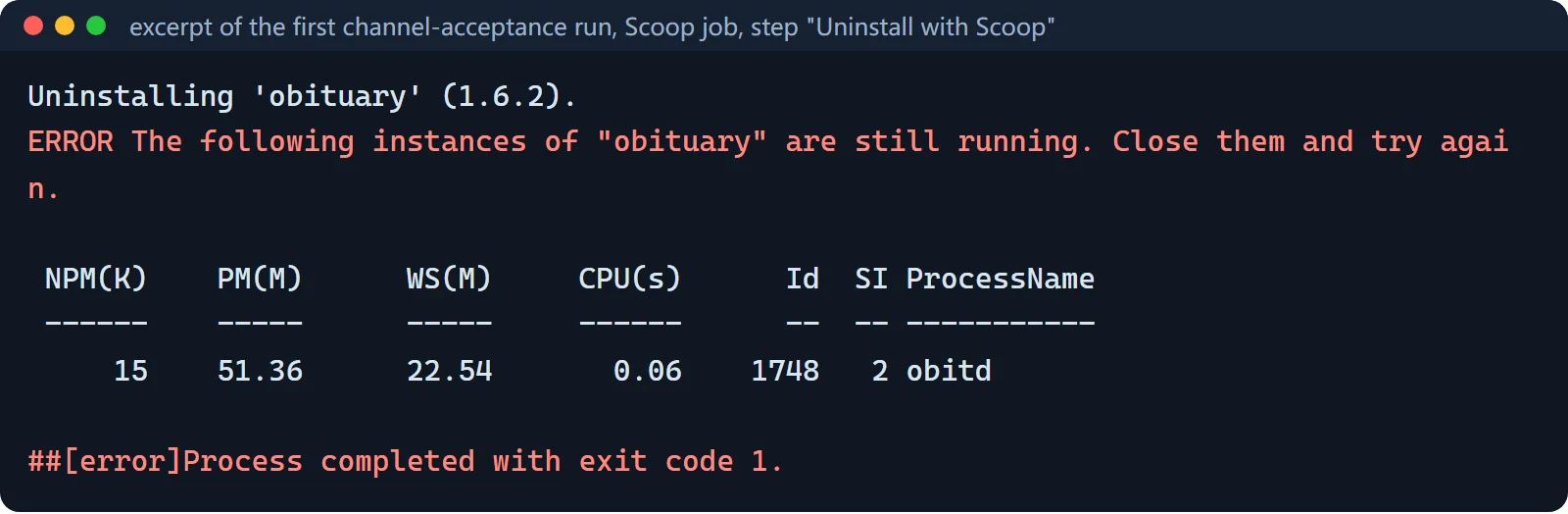
In the first run, both channels failed at the uninstall step.
How the acceptance runs: one manual workflow, three jobs
After a release, once both channels point at the new version, channel-acceptance.yml is triggered by hand with the version number, and it installs the package for real on disposable GitHub machines.
| Job | Machine | Uninstall path |
|---|---|---|
| Scoop, the documented path | Windows | obit uninstall --yes first, then scoop uninstall obituary, with the processes started through the current link |
| Scoop, the direct path | Windows | scoop uninstall obituary straight away, with the processes started from the versioned directory |
| Homebrew | macOS 15 | obit uninstall --yes first, then brew uninstall --cask obituary |
Each job follows the same script:
- Read the index and check that the version in it equals the version entered.
- Install from the channel;
obit --versionprintsobit version <version>andobitd --helpruns. - Register, list, bury and resurrect a sample file, and use
cmpto check that the resurrected content matches the original byte for byte. - Bury it once more, so the graveyard holds real content and not an empty directory.
- Leave the background process running (and on Windows the window too), then uninstall with the package manager.
- Check that
obitandobitdhave gone from PATH, and thatstore.jsonand the graveyard directory are byte for byte what they were before the uninstall.
What the runs do not cover: Windows arm64, Intel Macs, the DMG, and the first Gatekeeper approval on a personal computer.
Windows: the background process was still running, so Scoop refused to uninstall
scoop uninstall obituary reported that instances of obituary were still running and refused to remove it. The process it listed was obitd.
Real users will hit this too. You install Obituary, use it for a while, the resident tray process keeps running, and a plain scoop uninstall is refused.
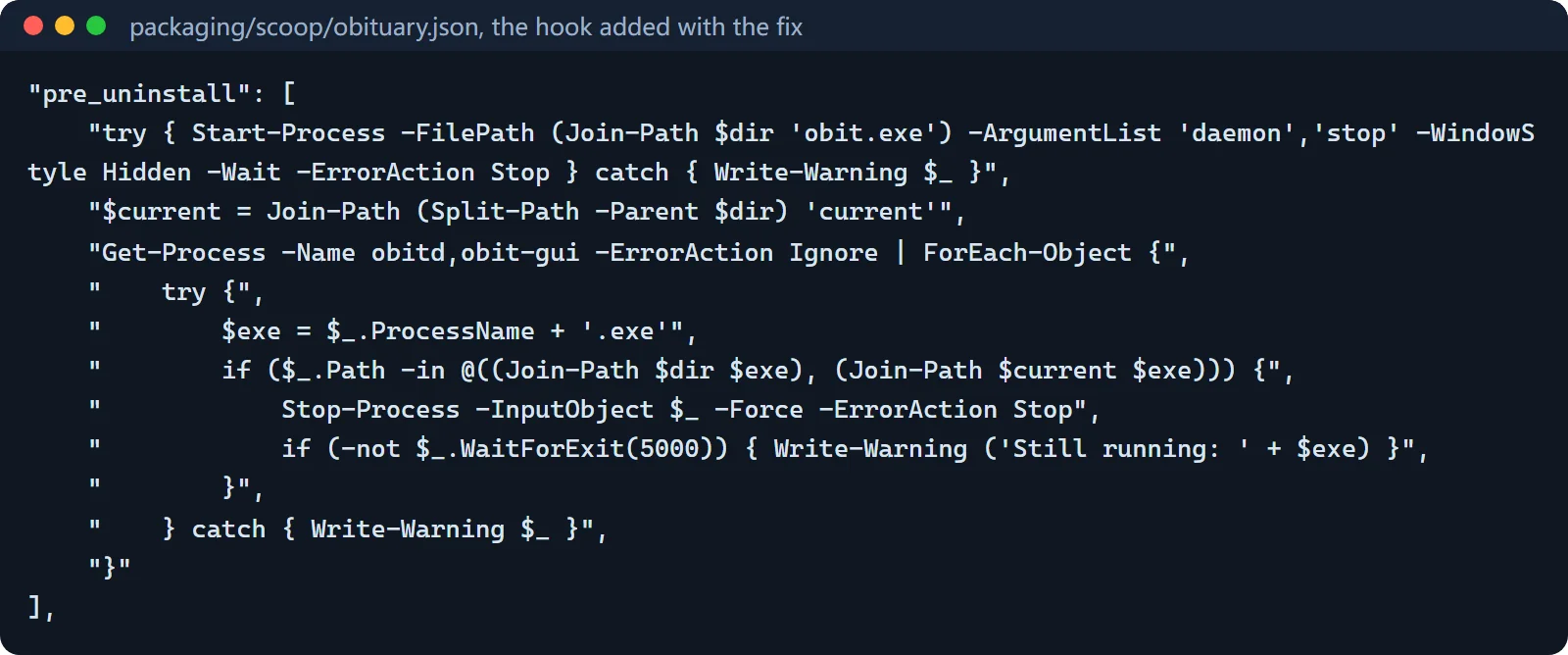
The first thing we tried was running obit daemon stop in the acceptance script before the uninstall, and that run went green. It meant working around the problem for the user, so it did not stay. The fix that stayed is in the Scoop manifest, which gained a hook that runs before the uninstall:
- It first runs
obit daemon stop, so the background process exits by itself. - It then looks for
obitdandobit-guiprocesses, handles only those whose path is under the versioned directory or thecurrentdirectory, force-stops them, waits 5 seconds, and warns if one is still there.
Both paths have to be covered, because a process may have been started from the versioned directory or through the current link, which is why the acceptance has two Scoop jobs.
A 1.6.2 that was already installed from the old manifest does not pick the hook up by itself. New installs, and every release from now on, carry it.
macOS: current Homebrew wants a third-party tap to be trusted first
In the first run the Homebrew job stopped at the step that reads the index, with Refusing to load cask ... from untrusted tap ... and a suggestion to trust the cask or the tap with brew trust.
The cause was that we read the cask with brew info before installing it, and current Homebrew will not load a recipe from a third-party tap until the tap is trusted.
The install command in the docs already uses the full name, with the tap in front, in the form:
brew install --cask <tap>/obituaryInstalling by the full name makes Homebrew trust the tap automatically, so neither the cask nor the docs needed to change. What changed is the acceptance script, which now reads the recipe in the index with git show HEAD:Casks/obituary.rb without loading it, and uses brew info to check the version only after the install.
The macOS uninstall has a stretch of its own. It first runs obit daemon enable to install the launchd user agent, uses launchctl kickstart to make it really run, and then runs obit uninstall --yes. It checks that both the plist file and the loaded service are gone (launchctl print returns 113), and finally runs brew uninstall --cask obituary and checks that the background process is gone too.
The result: three green jobs, data kept byte for byte
After the fix, 1.6.2 installs and runs from Scoop (Windows x64) and from Homebrew (macOS arm64), and each client uninstalls it. Both programs disappear from PATH, and the isolated ledger and the non-empty graveyard are byte for byte what they were before.
The workflow merged into main at 19:46 on 22 November. After 1.7.0 was released on 23 November we triggered it once more, and all three jobs passed with 1.7.0.