It started with a small question: a countdown for a file
On the evening of 7 November 2026 we wanted to give a file a countdown. By the end of the night the idea had a first version, one review, three rounds of names and the name Obituary.
On this page
7 November 2026 was a Saturday. Around ten at night we wanted to give a file or folder a time to live, so that it would be cleaned up automatically when the time ran out. By the end of that evening the idea had a first version of code, had survived one review, had gone through three rounds of names, and had the name it has today: Obituary.
First, has anyone done it?
We looked around first. Windows offers two routes. You can schedule a one-off task that runs Remove-Item at the right time, or use Storage Sense, which clears fixed places such as Downloads by age. The first needs a script for every file, and the second cannot be pointed at an arbitrary file. Third-party tools take almost the same approach: watch a folder and remove whatever is older than N days. Some are paid, some are free, and quite a few of the free ones have gone years without an update. All of them are rules per folder. Nobody offers a countdown on a single file, and nothing is built for the command line or for AI agents.
As a business this does not hold up. The need is small and fewer people would pay for it, the core is a timed delete that anyone can write, and the operating system could add a rule tomorrow and remove the reason for the tool to exist. Larger file-automation products treat it as one rule among many. So we had no plans for a general file-organising rule engine, and none for cloud sync.
One situation, though, is not covered at all. AI agents leave a lot behind in a workspace: debug scripts, logs, screenshots, test output, temporary worktrees. Our own rules file already had a line asking for the temporary files a task produced to be cleaned up when the task ends. That rule depends on the agent remembering it, and in a long session, once the context has been compressed, rules read earlier are easily forgotten. When the rule is remembered, the cleanup is often an rm -rf whose result nobody checks.
At the moment an agent creates a file, it knows best what the file is for and roughly how long it should live. If it writes down a lifespan right then, and the system deals with the file when time is up, nothing depends on remembering. That is where Obituary starts: what an agent produces carries a lifespan from the moment it is created.
A first version in thirteen minutes
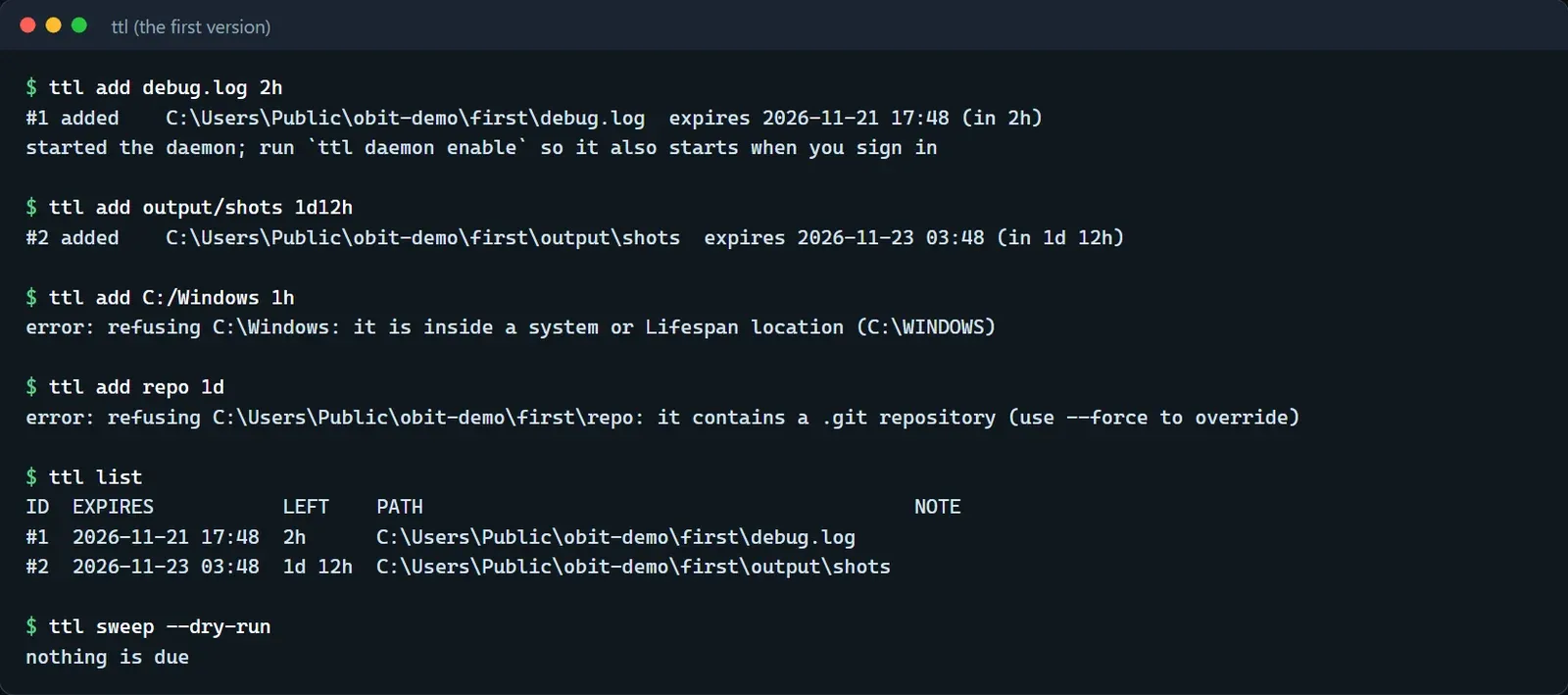
Once we decided to build it, Claude wrote the first version in about thirteen minutes. It was called Lifespan then, and its command was ttl, with add, list, extend, cancel, sweep and log, every command able to print JSON for scripts and agents. A background process started at login handled expiry. Items went to the Recycle Bin through the system's IFileOperation interface, and when the bin could not take an item, the file was kept and retried later instead of being deleted outright. Anything that expired while the machine was off or asleep was caught up after boot or wake.
Files were identified by their identity and not by path. The identity is the volume serial number plus a 128-bit file ID, so a renamed or moved file is still found, and a new file that now sits at the old path is left alone. Drive roots, system folders and Program Files cannot be given a lifespan, and neither can a user's own folders, although what is inside them can. Links and junctions are always refused. Git repositories need --force and are checked again when the time comes.
There were 17 tests, one of which really sends a file to the Recycle Bin and only runs when an environment variable is set. To check that the test for "do not delete if the identity does not match" could catch a bug, we broke that check on purpose and watched for red. The first attempt left a variable unused and the build failed, which proved nothing. A different change finally turned the test red. That detour became a standing rule: the reverted version has to compile, and a build failure does not count as verification.
The first review
That night we did not rush to install it on a machine we use every day. We asked two Codex reviewers to read the code first, read-only. One looked at deletion safety and use of the Windows API, the other at concurrency, storage, the background process and the command line. The results were back in about ten minutes: 26 findings. We opened the code for each one, and nearly all of them held.
The most serious group was mistaking one object for another. Register a temporary hard link and delete it, and a lookup by file ID could land on another name and send an important file to the Recycle Bin. 8.3 short names such as PROGRA~1, and paths whose parent directory is a junction, slipped past a protected-path check that only compared strings. When Downloads or the Desktop had been moved to another drive, protection recognised only the default location.
The second group was checks that failed in the permissive direction. The .git check looked only at first-level subdirectories and let the path through when reading failed, and a transient error such as a locked file or a permission problem was treated as the file being gone, so its record was dropped.
The third was state and durability. A sweep worked from a snapshot taken at its start, so items extended or cancelled in the middle were still processed afterwards. Writes were not flushed before commit, so a power cut could lose updates, and duration arithmetic could overflow and get around the ten-year cap.
A version written in thirteen minutes yielding this many findings is hardly a surprise. Mistaking one object for another is the most dangerous moment for a tool that deletes things, because it treats what is in front of it as what was originally registered, and that kind of problem kept coming back over the following week. Making this version trustworthy was most of the work of the next two weeks.
The name
Nobody would remember Lifespan or ttl, so we went through three rounds of names. The first round was poetic (morning dew, mayfly, night-blooming cereus) and not catchy enough. The second turned to the image of something collected when its time is up. 生死簿, the book in which the king of the underworld is said to record every person's lifespan, with Grim as its English name, fitted well, but it shares a name with a commonly used screenshot command on Linux. In the same round was Atropos, the Fate of Greek myth who cuts the thread of life, and a search showed an existing open-source project in the AI space that would have outranked us.
For the third round we checked for collisions first and chose afterwards. Nothing with that name exists on npm, Homebrew, PyPI, crates.io, Debian or Arch, and we settled on Obituary (讣告 in Chinese), with the command obit and a background process obitd. The commands follow the theme and keep plain aliases: mark is add, spare is cancel, and reap is sweep.
Direction
With the name fixed, the direction was fixed too. Obituary is designed for AI agents first. Hooks, MCP and Skills are first-class entry points, installing should take one command and removal should leave nothing behind, and the differences between agents have to be respected. The context menu and tray for people come later. On platforms we start with native Windows, using file identity and handles directly, and leave macOS and Linux for afterwards. The way of working is write, review, fix: after each phase two reviewers read the code, we fix what they find and ask two more, and we repeat until a round turns up nothing serious before moving on. Nearly all of the next two weeks went that way. The language is Go, and the reasons have a post of their own.