The container write layer and WSL mounts: why we refuse to register, and what the message says
Obituary recognises a file by its persistent identity. A Docker container's own write layer (overlayfs) and a Windows mount inside WSL such as /mnt/c cannot supply a reliable one. On 23 November we checked both boundaries on real machines: on a container write layer obit mark refuses and the file stays where it is; a directory bind-mounted in works normally; and on a Windows mount in WSL the Linux edition used to fail with a rename error nobody could act on, and now says plainly to use the Windows edition, so two ledgers never manage the same file.
On this page
Obituary recognises a file by its persistent identity. Two kinds of place cannot give a reliable one, and on 23 November we checked their boundaries on real machines.
On a container's write layer and on a Windows mount in WSL, Obituary refuses to register, leaves the file where it is, and says what to do.
Why it refuses: device plus inode gets reused after a deletion
A file that is deleted and created again, even at the same path, must not be mistaken for the original. On Windows Obituary uses a 128-bit file ID. On Linux and macOS a device number and an inode are not enough, because both can be reused after a deletion, and a path that is deleted and recreated may get the same pair of numbers.
So on POSIX the identity has to carry a creation time or a generation, and it is refused when it does not. If we cannot tell "an object that was deleted and recreated" from "the original object", we cannot give it a safe lifespan.
The Docker write layer: refuse to register, leave the file alone
A container's own writable layer is overlayfs, and it cannot supply a persistent identity.
We made a temporary tag from the local ubuntu:24.04 and ran it with docker run --rm --network none, as an ordinary user with no added capabilities, and stat -f confirmed that /tmp is overlayfs.
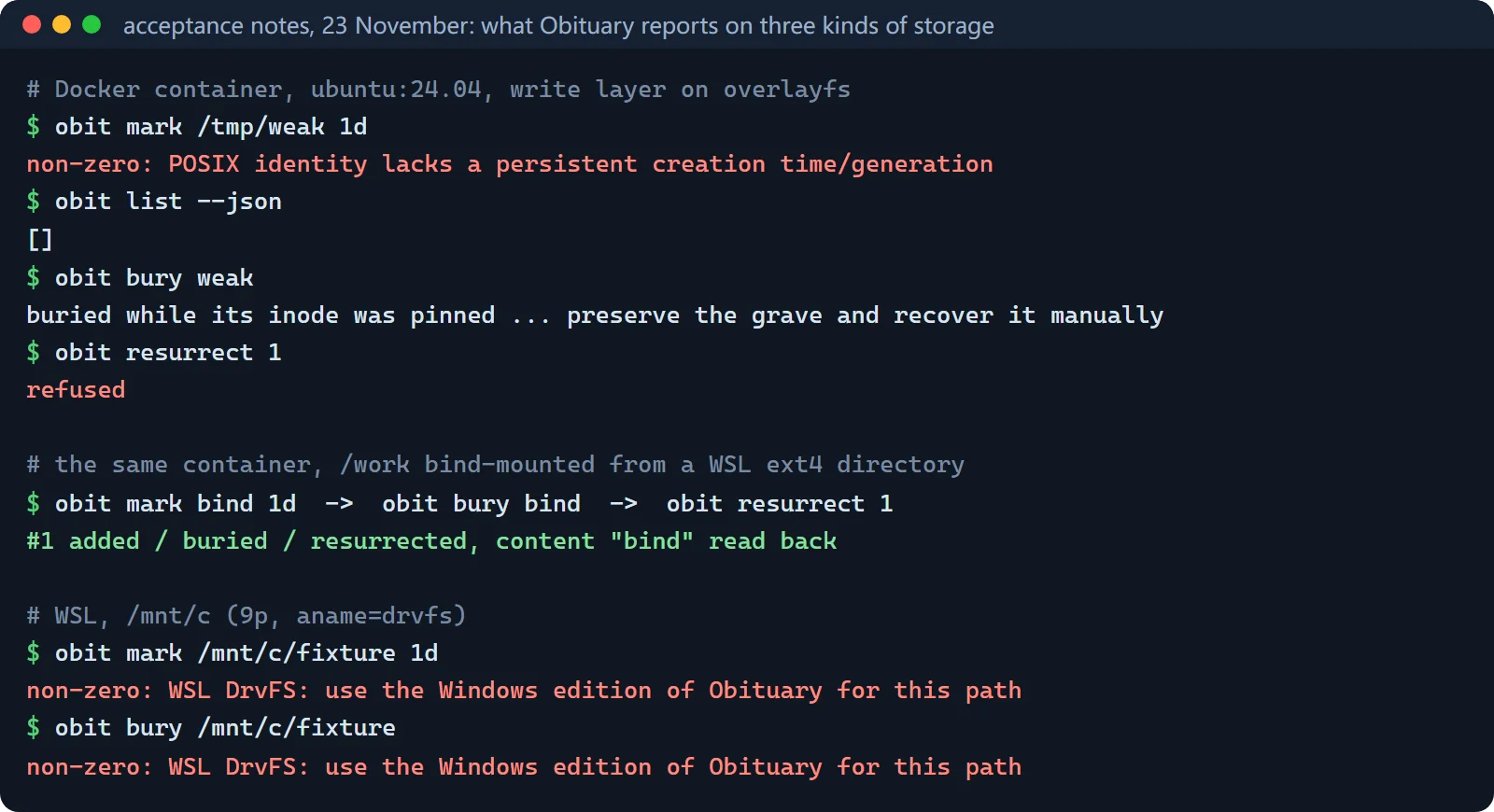
obit mark /tmp/weak 1dreturned non-zero withPOSIX identity lacks a persistent creation time/generation.- Reading
weakstraight back showed the file still in place.obit list --jsonwas[], and the graveyard hadburials: null, pendingCount: 0. - The failed registration did not turn into a move.
Running obit bury by hand on such a write layer moves the file into the graveyard, but it cannot be resurrected automatically. Only a separate obit bury weak moves anything, with the notice buried while its inode was pinned ... preserve the grave and recover it manually, and a following obit resurrect 1 is refused. This is a different thing from an automatic expiry, so this kind of manual burial must not be advertised as recoverable.
A directory bind-mounted in works normally
In the same container we bind-mounted a directory on WSL's native ext4 to /work, with both the files and Obituary's data directory inside that mount. mark bind 1d, bury bind and resurrect 1 reported #1 added, buried and resurrected in turn. After the burial was confirmed the source path was gone, and after the resurrection the original content read back.
We did not assume that every volume provides a persistent identity. The advice in the docs is to keep the files and the data directory on a volume or bind mount backed by a filesystem such as ext4 that can provide one.
A Windows mount in WSL: it used to be an error nobody could act on
In WSL a path such as /mnt/c is a Windows drive. findmnt shows it as 9p, and its mount options include aname=drvfs.
The old Linux edition behaved inconsistently here. mark failed but suggested using the Linux bury. If you followed the advice, the old build really tried to bury the file immediately and then, because the mount does not support a safe rename, ended with retry ... nothing was overwritten (invalid argument). What the user saw was a rename failure with nothing they could do about it.
The Linux edition now refuses plainly on such paths:
WSL DrvFS: use the Windows edition of Obituary for this pathWe checked with two ledgers that it never manages the same file twice:
- The Windows edition first registered a test file as
#2. - A Linux process, in a separate mount namespace, bound the same Windows temporary directory to
/mnt/cand ranmark /mnt/c/fixture 1dandbury /mnt/c/fixture. Both returned non-zero with the message above, and the content still read back as it was. - On the Linux side
list --jsonwas[]and the graveyard had no entries. On the Windows side the list still held only#2. - After the Windows edition ran
burythe source path was gone, and afterresurrect 2the original path and its 7 bytes of content matched the original.
The two ledgers share nothing, so neither manages half of the file.
The check looks at the device, not at the /mnt/ prefix
The detection sits at the entry of Linux file operations. It takes the major and minor numbers of the device the file lives on, finds the matching 9p mount in /proc/self/mountinfo, and refuses only if its options include aname=drvfs.
The reason is that DrvFS can be mounted somewhere else, or bind-mounted elsewhere, so guessing from a path prefix would miss those cases and would catch other 9p shares by mistake. Other 9p shares that can be recognised are not rejected wholesale. The identity algorithm, the ledger and the burial and resurrection protocol did not change.
The first version put it in the wrong place: valid commands were refused
The first version put the check into general path resolution. With a project on DrvFS as the working directory and a native file in /tmp as the target, a valid command was refused too.
The final version limits the check to the Guard's check on "managed objects", and project lookup is no longer affected by it. In the same project, mark, bury and resurrect on a native file read back native, and that holds alongside the plain refusal of a DrvFS file.
The tests use OBIT_TEST_DRVFS_PATH pointing at a real file. TestDrvFSOwnershipAppliesOnlyToManagedPaths keeps the check to managed paths, and Test9pDeviceOwnership covers an aliased mount, a plain 9p mount and an unknown device. With the final Guard check removed (a temporary copy that still compiles), the first test fails with missing Windows handoff: <nil>, which shows it can catch the mistake.
The fix merged into main at 15:11 on 23 November.
What the user docs say
The home page and the install notes in all ten languages carry the two points:
- WSL: keep projects and agent configuration on the native Linux filesystem, for example
~/projects. DrvFS mounts such as/mnt/cmay not support the safe renames installation needs, and for registering, burying or resurrecting files on those mounts, use the Windows edition only. - Docker: if a container's overlayfs cannot provide a persistent file identity,
obit markrefuses to register and leaves the file in place. To use lifespans and resurrection, keep the files and Obituary's data directory on a volume or bind mount backed by a filesystem such as ext4 that provides persistent identities.
What was not tested
WSL1, other overlayfs set-ups with exports enabled, and every volume driver were not tested.