The Linux Trash, and why expired files on macOS and Linux are not buried automatically
On 23 November the Linux edition gained a system Trash mode: files go into the Trash as the freedesktop specification describes, desktop tools can restore them as they were, and a failure neither copies nor permanently deletes. The macOS Trash cannot be confirmed to work with Finder's Put Back, so it stays closed. The same day macOS and Linux also gained folder policies for Downloads, but expired files simply stay where they are instead of being buried automatically: before burying, the file must be guaranteed not to be written by another program, which Windows does with an exclusive open and which we measured to be impossible on macOS and Linux.
On this page
The Linux Trash mode is done and folder policies can be set on macOS and Linux, but expired files are not buried automatically. The second part is stuck on a guarantee that Windows can give and these two systems cannot.
Before burying, we must be sure no other program is writing the file. Windows does that with an exclusive open, and on macOS and Linux we measured that it cannot be done.
The Linux Trash: put in as the specification says, restored by desktop tools as it was
graveyard.mode = recycle already worked on Windows and now works on Linux too. A buried item goes into the system's own Trash, is restored with the desktop tools, and does not enter Obituary's own graveyard.
Following the freedesktop Trash specification, we did these things:
- The file goes into
files/and its information intoinfo/*.trashinfo, in private 0700 directories. The original path is URL-escaped and the deletion date is local time. - A mount ID tells apart different mounts that share a device number. On other volumes the shared
.Trash/<uid>is preferred, and otherwise a private.Trash-<uid>is used. - The item is first staged and verified outside
files/, which the system may empty, and only then published. Publishing and rolling back both use same-volume moves with a pinned parent that never overwrite, and both verify identity. - A failure neither copies nor permanently deletes.
Acceptance: an independent Trash client restores it, byte for byte
The checks ran in WSL's /tmp with a separate data directory, config directory and XDG_DATA_HOME:
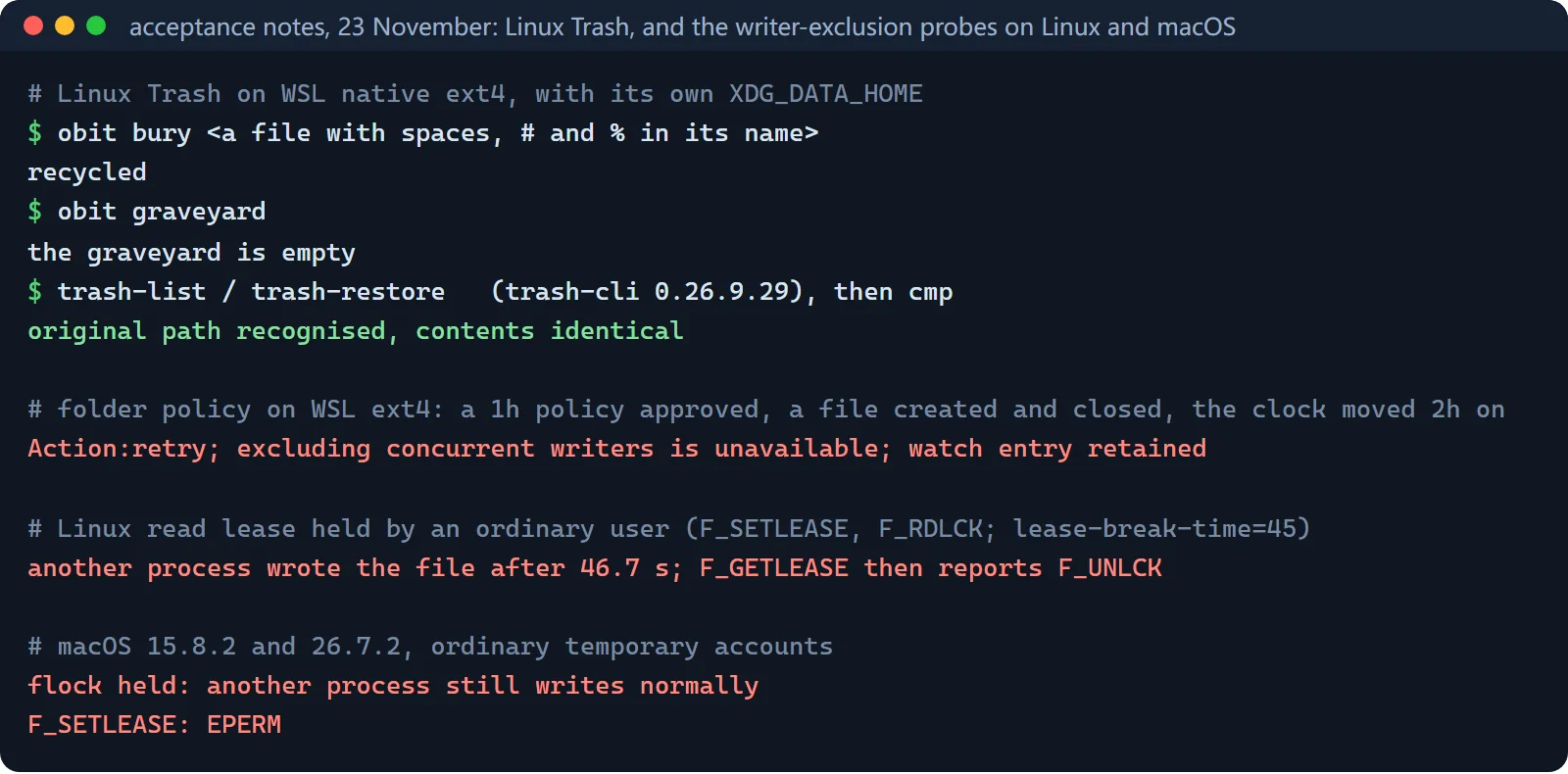
obit buryon a file whose name has spaces,#and%printedrecycled, andobit graveyardprintedthe graveyard is empty. The independenttrash-listandtrash-restore(trash-cli 0.26.9.29) recognised the original path, and after the restorecmpfound the bytes identical.- A different volume: we created a private tmpfs mount with
unshare -Urnm. ThePath=volume-filein.Trash-0/info/*.trashinfois a relative path, andtrash-restore --trash-dirrestored it with a passingcmp. This client does not enumerate the test tmpfs by itself, so we named the Trash explicitly, and no real external disk was used. - A bind mount: before the fix we got
invalid cross-device linkand the original file stayed; after the fix a mount with the same device number creates its own.Trash-0and the content matches.
Failing safely: three tests, each guarding one thing
TestRecycleLinuxDesktopEntry: before the implementation it reportedoperation is not supported, and after it both entries of the same name are kept, with the encoding and the date readable.TestRecycleLinuxRejectsRedirectedTrash: when the Trash directory is redirected, the source file survives and the target of the link is never written.TestRecycleLinuxPublishFailureRestoresSource: after a failed publish, the original content is intact.
We built a mutant with the rollback disabled (a build that compiles), and the target test really failed, with the source file reporting no such file or directory.
The limit on recovery
On Linux the desktop tools restore from the system Trash, and no Obituary graveyard entry is created. Once the system empties the Trash, obit resurrect can no longer bring the file back. An interrupted or failed run can leave a .trashinfo with no payload, and on a conflict that cannot be rolled back the staged object is kept, so you have to check the path in the error message by hand, and nothing is force-deleted.
The macOS Trash stays closed: being in the directory is not the same as Finder putting it back
On macOS 15.8.2 and 26.7.2, as a disposable system user, we tried two ways: /usr/bin/trash and a plain mv. Both can send a file into that account's .Trash, and when they fail on a read-only source directory the original is still there.
The catch is that this isolated account has no Finder graphical session. A file being in the Trash directory does not mean Finder can see it, and still less that Put Back will work. We could not confirm it, so macOS does not enable the Trash mode, and we do not mv a file back by hand to imitate a system restore. In the docs macOS still has the graveyard only.
Folder policies: macOS and Linux can set them, and expired files are not buried
A folder policy such as the one for Downloads gives a folder a lifespan: a file that newly appears in it is buried when its lifespan runs out, counted from when Obituary first saw it. That day macOS and Linux gained the ability to set one.
Events and catch-up use the existing implementation: fsnotify with non-recursive watches, plus a full reconciliation every 5 minutes, so there is no need to bring in FSEvents, CGO or a new dependency. The tests cover several rules:
- With the reconciliation interval set to an hour, policy changes and new files are still found, and files that arrived while we were offline are picked up.
- A file seen for the first time needs approval first; a subdirectory only produces a proposal and is not buried directly; a temporary download file (
.crdownload) is not registered, and once it gets its final name it is counted again from first discovery, for 2 hours. - A lifespan on an existing parent folder cannot bury the policy folder itself.
The acceptance also found a real gap at the entry point. The old POSIX command-line test had deliberately avoided ~/Downloads and used Downloads/inbox. Changed to the real ~/Downloads, it returned it is or contains a protected folder. After reusing the existing WatchAllowed, the test passed, while Guard.Check(downloads, true) still refuses: the policy can be set, and the deletion guard was not loosened. The Linux Trash and this entry fix both merged into main at 17:23 on 23 November.
The one that failed: a quiet, closed, expired file cannot be buried automatically
We ran an independent acceptance on WSL's native ext4: approve a 1h policy, create and close a plain file, reconcile, and move the business clock on by 2 hours. The expectation was buried, and what came back was:
Action:retry; excluding concurrent writers is unavailable; watch entry retainedThis is a deliberate refusal in internal/winfs/watch_unix.go, and it protects a contract: from the start of the observation until release, other writers stay excluded. To meet it on Linux and macOS we tried the two ready-made mechanisms, and neither works:
- The Linux read lease. An ordinary user asks for
F_SETLEASEwithF_RDLCKand keeps the file descriptor open. On WSL with the defaultlease-break-time=45, a write by another process succeeded after 46.7 seconds andF_GETLEASEturned intoF_UNLCK. We did not change the sysctl. - The macOS lock. On temporary ordinary accounts on 15.8.2 and 26.7.2, another process could still write normally while a
flockwas held, and asking for the DarwinF_SETLEASEreturnedEPERMevery time.
This rules out those candidate mechanisms and does not prove that no solution exists on these platforms.
So today a file under a folder policy on macOS or Linux stays where it is once it expires, and approving an expired subfolder does not move it. A manual obit bury is unaffected, and the docs say so.
The next step is decided and not built yet
For expiry we want to make it an optional setting. By default, after expiry the file waits a further 10 quiet minutes, and is buried automatically only if nothing can be found that has it open. The other option turns it into a proposal that is buried only once approved. The docs will say plainly that macOS and Linux cannot guarantee, as Windows can, that no other program is writing. This comes later, and the current version still leaves expired files alone.
What was not tested
Finder on a real screen, the system's Put Back, whether a desktop notification really appears, and the automatic POSIX burial that is blocked until write exclusion holds. The macOS results come from disposable machines at GitHub and were not run on a Mac of our own.